

Management to-dos · Integrations and AI
Daily management overview with targeted AI use
Preparing the daily overview should not eat up time on repetitive work.
- Task
- Daily management to-dos from scattered information
- Initial approach
- Long agent runs that consume many tokens
- Solution
- Integrations, preserved state and targeted AI
Yet another daily agent run is not enough on its own
Management to-dos rarely arise in a single place. A commitment appears in an email, the deadline in the task manager, a customer-related development in the CRM, and the decision is made in a meeting. From all of these, a short, current and traceable overview should be put together by morning.
The obvious solution seems to be launching a general-purpose AI agent every day that goes through the systems and summarizes the to-dos. That, however, can mean many consecutive queries, repeated reading and decisions. In the example, such a run could take as long as 10–45 minutes, consuming many tokens and creating more room for error.
So the goal became to plan regular data collection and state management in advance. The AI should only have to watch what has changed and what follows from it, while routine steps are handled by a predictable program.
Integrations collect, AI interprets
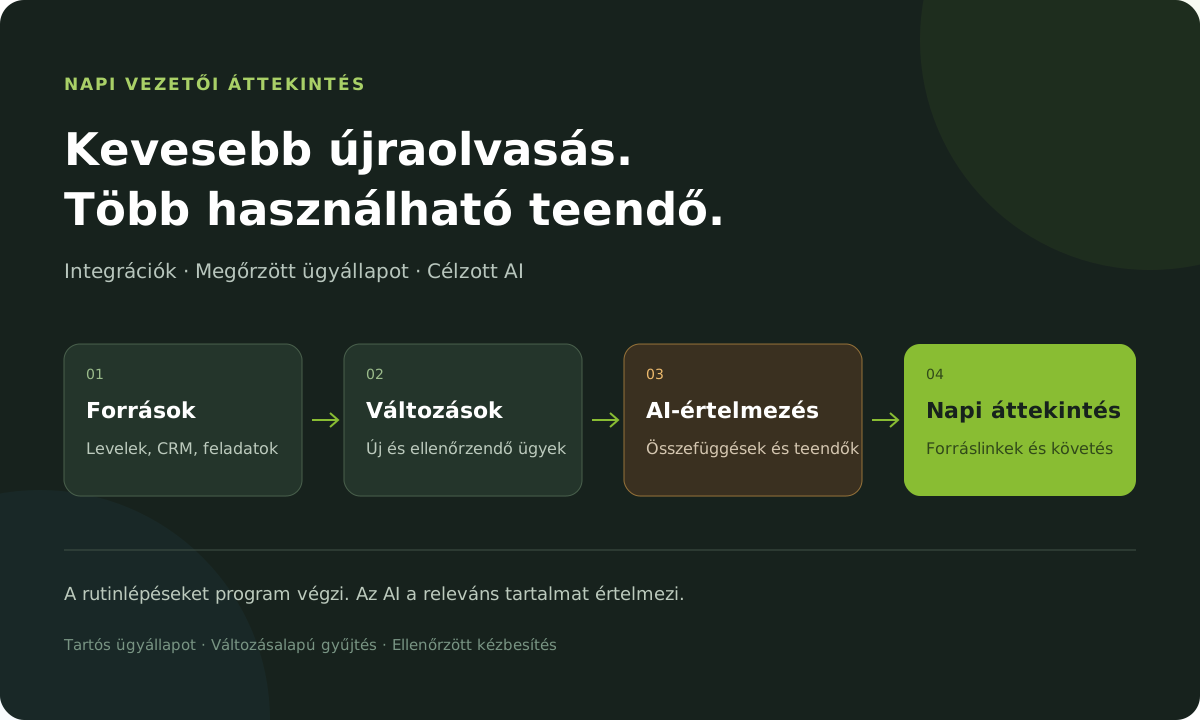
The solution builds a daily management overview from Outlook email and calendar, Trello tasks, HubSpot records, selected Teams conversations and Fathom meeting summaries. It uses connectors for data collection, while a local program manages the daily work plan and the state of the cases.
Before collection, the system determines which period and which tracked cases need to be checked in each source. The AI looks in these for decisions, commitments, deadlines and blockers; from related information that appears in several places, it formulates a to-do you can follow.
The result is a report with a fixed structure. A program checks it, saves it to the database and forwards it to the personal Trello list. Besides the to-dos, the confirmed events of the previous working day and the events expected today are shown separately.
Where the repetitive work sits in the process
From the sources to the daily to-do list
What makes it faster and more economical?
Six techniques to reduce repetitive agent work
We start from the changes
For each source we keep the time of the last successful collection. The next run continues from there, with a small overlap. Even after a missed day, it processes the period that has not yet been reviewed.
Identifiers first, full content later
Where possible, we first look up only the modified records. We fetch full email threads or detailed card content only for cases that have changed or need a targeted check.
Cases keep their history
A local database stores the identifiers, status and review history of cases. The same task can be linked across several sources, and unchanged history does not have to be reprocessed every day.
Daily refresh and periodic reconciliation
The daily round concentrates on what is new and on important tracked cases. A less frequent, deeper reconciliation complements it, so older blockers and commitments do not get lost.
A finished collection can be reused
The daily result is kept as a structured report. If delivery of the to-do list fails, processing can continue from the saved report: the AI does not have to read through the same sources again.
An incomplete run stays visible
A partly available source does not count as fully reviewed. The system flags the gap, does not advance the time of the last successful check, and does not blindly create another copy when delivery is uncertain.
The morning overview is built on current cases
The way it works puts new and substantively changed cases first. The history of unchanged to-dos is kept, and previously closed cases return to the daily view only when there is a new development. Every to-do can have a source link, an owner and a known deadline.
We improved speed and token use through fewer repeated queries, less content to interpret and routine work done by a program. Error handling, in turn, becomes easier to follow thanks to the saved reports, the per-source check state and the re-verified delivery.
The lesson of the project is that to increase efficiency with AI, the automation itself must also be organized efficiently: it is worth planning what should happen through integration, what the system should remember, and which step truly needs AI interpretation.