

SME processes · HR automation
HR matters in one place
From the leave request to payroll preparation: less copying, connected steps.
- Context of use
- The internal HR administration of an SME
- Starting point
- Separate systems, PDFs and Excel spreadsheets
- Solution
- A shared HR interface and data handover
The information existed, just in several places
We present the monthly payroll preparation of an SME: the previous month's HR data had to be collected from several systems, put in order in Excel, reconciled with the accountant, and then the salary transfers had to be prepared one by one.
Leave and payslips were in one system, the office attendance schedule lived in a separate interface, and internal know-how was kept in a wiki. Monthly payroll preparation was held together by spreadsheets maintained by hand.
The same data had to be re-entered at several points. Every switch between programs and every transfer demanded more attention and created another chance for error.
We connected the steps of the process
We built an internal interface where employee data, contracts, leave, payroll preparation and payslips are available together. The system carries the existing data on to the next step, so the administration can focus on the variable items and on checking.
The accountant and the bank are still part of the process. The difference is that at several points, export, import or automatic data transfer takes the place of entering data one by one between systems.
Monthly payroll preparation, step by step
The same task, with less manual transfer
The six points follow the same tasks through the old and the new routine. In the new way of working, the system takes over more of the data transfers.
01Collecting absences
Old process
We open the leave management tool, then copy the monthly absences into the payroll preparation Excel.
Leave tool → manual copying → Excel
New process
The monthly payroll summary takes over the approved absences from the shared leave management.
Automatic transfer into the payroll summary
02Pay data and variable items
Old process
We add the hours worked, pay changes, bonuses and other supplements to the Excel.
A monthly spreadsheet assembled by hand
New process
The basic contract data is already in the interface. We record the hours and the one-off items here; the amount for hourly-paid staff is calculated from the contract.
We focus on changes, not on basic data
03Handing data over to the accountant
Old process
We send the Excel spreadsheet, assembled by hand from several sources, to the accountant.
Data collection and spreadsheet assembly
New process
We export the Excel intended for the accountant from the system and send that on. The spreadsheet remains the means of handing over the data.
Excel export from the existing data
04Processing the payslips
Old process
We go through the PDFs coming back from the accountant and check the amounts belonging to each employee.
One-by-one processing
New process
A PDF containing the payslips of several employees can be uploaded in one go. Text recognition helps assign the pages and extract the data; we check it before saving and correct it if needed.
Shared upload and verifiable data recognition
05Carrying over the net amounts
Old process
We also enter the net amounts from the payslips separately into the monthly Excel spreadsheet.
PDF → manual copying → Excel
New process
The net amount recorded for the payslip also appears in the monthly payroll summary and can be used to prepare the bank transfer.
The same data serves several steps
06Preparing the transfers
Old process
We enter the beneficiaries and the transfer details one by one, by hand, in the bank interface.
One-by-one data entry at the bank
New process
We check the amounts, account numbers and payment references in the preview, then export a package that can be imported into CIB Business Online (the bank's online banking service). Loading and approval take place in the bank.
Verified package → bank import and approval
Less copying, checking stays
Shared data replaces the manual transfer of absences and net pay; a package that can be imported replaces entering items one by one at the bank. Entering hours and one-off items, checking the recognized data and the bank approval remain the job of the responsible colleague.
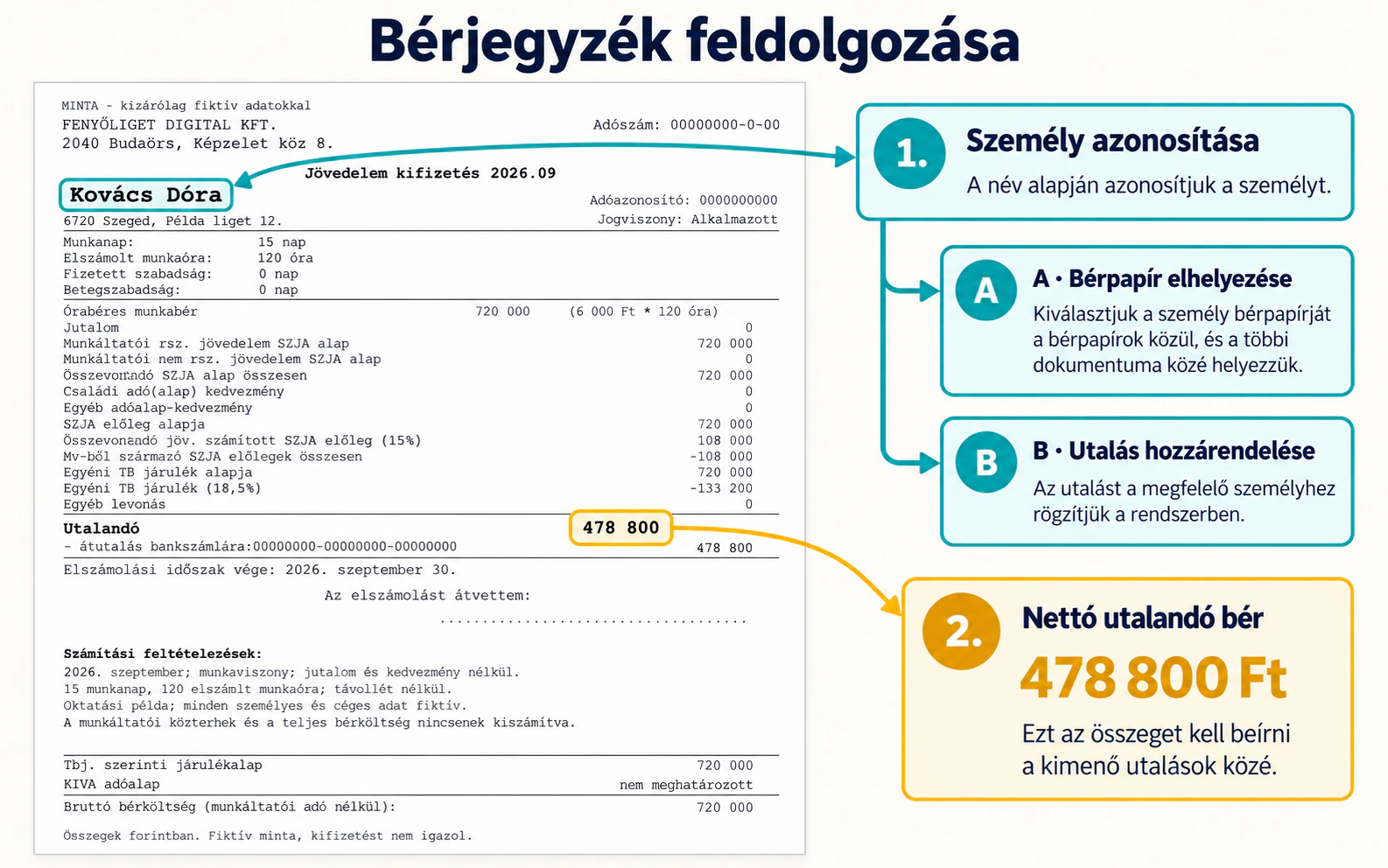
Processing the payslips
From the payslip to the transfer data
During processing, the payslip has to be assigned to the right employee, and the net amount to be paid has to be carried over to the monthly summary and to the preparation of the transfer. Text recognition helps with this; we check the recognized data before saving.
The central interface of the new process
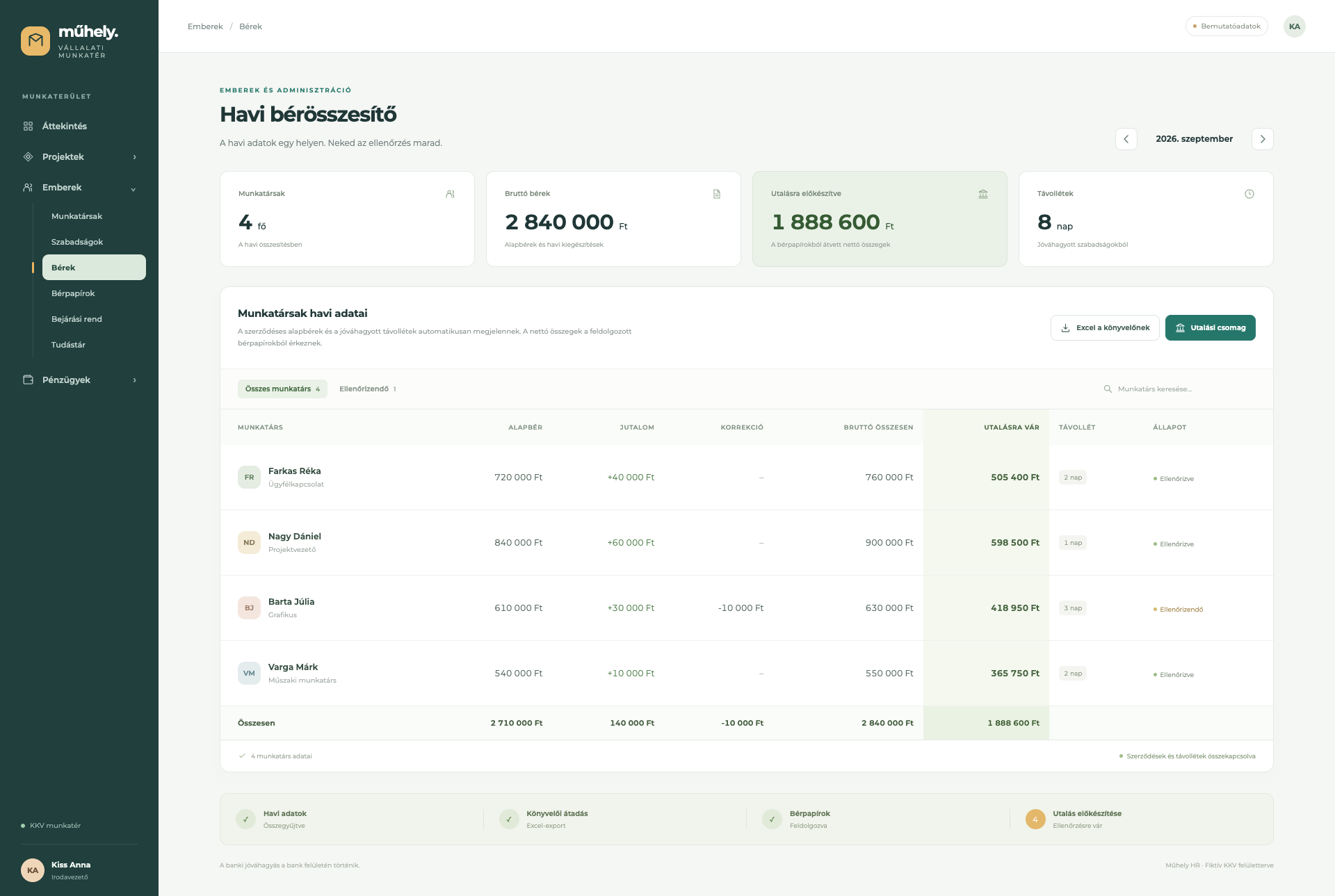
The monthly payroll summary
Contractual pay data, absences, variable items and the net amounts taken over from the payslips are visible in one place. From here you can also start the accountant's Excel export and the preparation of the bank import file.
Fewer transfers, more attention for exceptions
Monthly administration is no longer organized around repetitive data copying. The system collects the existing data, variable items can be handled in the same place, and you can return to the summary of an earlier month or to an employee's payslip in the same interface.
With PDF processing, the recognized data can be checked and corrected before saving. When the bank package is prepared, the system checks the account numbers and flags the items left out because of faulty data; financial approval stays in the bank interface.
The shared interface helps on the other days of the month too: leave requests and remaining allowances can be followed together, the weekly schedule and the office headcount limits can be managed in the attendance schedule, and the internal knowledge base is reachable from the same menu.