

Finance · Process automation
Monthly overview from bank transactions
Trainable financial administration: an exception you resolve once also helps the following month.
- Starting point
- A script and recurring manual corrections
- Solution
- Classification and rule saving in one interface
- Result
- A shared monthly, quarterly and annual overview
The difficulty came from recurring exceptions
At the start of every month the bank data arrived and the sorting of financial transactions began. From the monthly turnover we wanted to see where our income comes from, what we spend money on, and how the company's operations are developing.
A script already did most of the work, but there were always new partners, unusual payment references and one-off cases left over. These had to be classified by hand, and the improved recognition had to be fed back into the processing separately.
What we corrected once was not necessarily handled correctly the next time. Monthly administration therefore also meant sorting out known exceptions again. We made this more transparent and easier to train in Vitarex's internal finance module.
Classification and training now live in one place
In the new interface, after the bank export is uploaded, the system classifies the transactions according to the existing rules. When importing overlapping periods it filters out transactions that were already loaded, so you do not have to hunt for duplicates by hand after uploading the same period twice.
Transactions still waiting for classification are highlighted. The category can be changed directly in the list, and in the detailed editor you can also set the partner, the VAT treatment, a note and whether the item is excluded from the summary.
A "struck out" transaction can be, for example, a transfer between the company's own bank accounts: the money only moves from one of its own accounts to another. This is neither new income nor a payment to an external party, so it is left out of the income and cost totals. The bank transaction itself is kept, so the transfer can still be looked up later.
A reusable rule from a single correction
If, for example, we classify a hosting fee under the "Licenses and services" category, we can immediately create a rule from the provider name in the payment reference. At the next import, an expense matching it can automatically land in the same place.
Training here means saving concrete, verifiable rules. Based on the partner name or a characteristic part of the payment reference, you can record not only the category but also the VAT treatment, the partner's name and whether the item is skipped; income and expense directions can be handled separately.
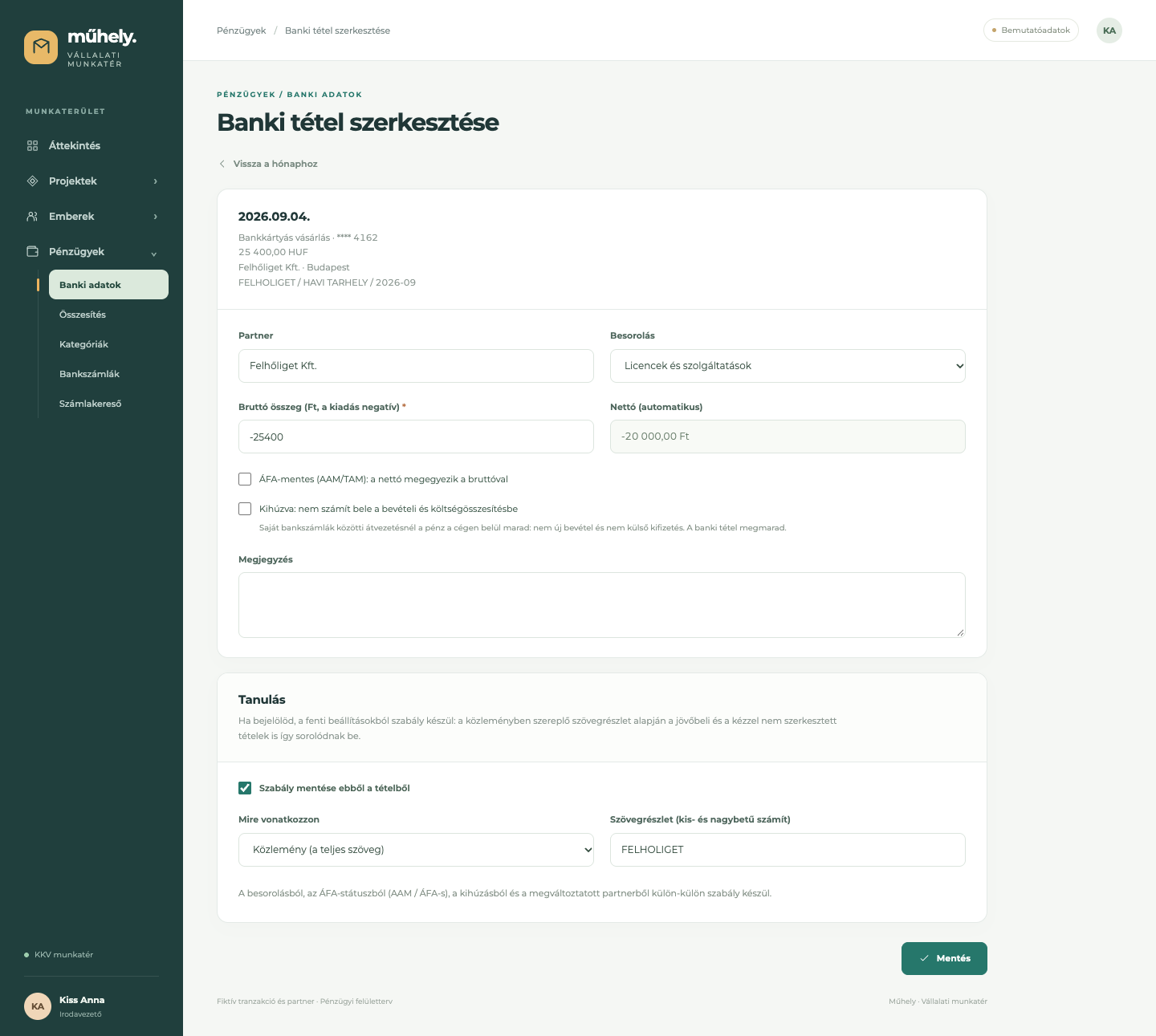
The rules can later be reviewed and edited in a separate interface. A new rule can also update the classification of previously loaded transactions that have not been modified by hand. Transactions already sorted out by hand are preserved by the automatic reclassification.
The monthly routine
Upload, review, overview
Upload the bank export
The existing rules classify the known transactions. The import filters out transactions already loaded from overlapping periods.
Resolve the exceptions
The user reviews the new cases, corrects their classification and, if needed, saves a rule for similar transactions.
One shared financial picture
Monthly, quarterly and annual summaries are built from the classified transactions, without assembling separate spreadsheets by hand.
Twelve months, four quarters, one annual picture
The financial summary builds itself automatically from the classified bank transactions. Income, direct costs and general operating costs appear in the same category system; from these the interface also calculates contribution margin, ratios and the overall result.
The same data also produces a full year broken down into twelve months with an annual total column. By switching views you can compare the four quarters, and the report can be exported as a one-page PDF. Fresh data and classifications show up the next time the summary is opened.
The system separately shows the number and net amount of unclassified transactions, so you can follow which data still needs sorting out. These are not included in the report until then. Struck-out transactions, by contrast, are left out deliberately: money moving between your own bank accounts therefore does not artificially inflate either income or expenses. The overview is based on bank money movements and the classified transactions available.
The monthly process thus focuses on uploading the bank export, reviewing new cases and, where needed, extending the rules. In one place you can sort out the transaction and specify how the system should handle similar items, without asking for a separate script change.